

StereoMovie Maker functions both as a versatile stereo movie editor and stereo movie player.
Download;
StereoMovie Maker Ver1.21 2533kByte 19/Dec/2010
StereoMovie Maker Ver1.30a(Exe file only) 631kByte 3/Dec/2014
Online help
Ver1.30->1.30a
- Fixed problem that after installing Gopro studio, You can not launch the SMM with this message 'No DLLS were Found in the Waterfall Procedure'.
Ver1.21 -> 1.30
- Added save options. (Menu -> File -> Save Stereo Movie)
Keep Aspect Ratio
Half Width
Vertical Interlaced
- Added save options for Nintendo 3DS. (Menu -> File -> Save as 3D AVI file)
Added Nintendo 3DS save options
Change audio (11024Hz -> 48000Hz)
Added EXIF DATE
- Added Crop modes (Manu -> Adjust)
Crop(3:2)
Crop(480:240)
Crop(400:240)
- Added 'Change date for 3D-AVI of 3DS' (Menu -> File)
- Added image rotation with key.
Shift+right arrow key
Shift+left arrow key
Ver1.20 -> 1.21
Some bug-fix
Ver1.10 -> 1.20
The latest release of SMM adds the image size '1280x720' to "Save as 3D AVI file' to support the new Fuji W3 3D camera.
The audio conversion for 3D AVI is now improved, allowing previously unshowable movies to be displayed on the W1/W3.
For movies that continue to give problems, SMM automatically uses 'ffmpeg.exe' for audio conversion, if it is in the same folder as SMM.
MJPEG files produced by 'keychain' cameras are now supported, even if they contain incorrect frame information.
Ver1.01 -> 1.10
'StereoMovie Maker' (SMM) now supports nVidia 3D Vision and the iZ3D monitor.
A movie frame may be copied to the clipboard using the usual Ctrl+C key combination.
An image-editing program may then paste it as a new image or layer.
Ver0.96 -> 1.01
The latest version of SMM allows you to open and play 3D-AVI (Stereo AVI) files as produced by the Fuji FinePix Real3D W1 camera.
You may also extract the individual left/right movies and save in the same folder with '_l' and '_r' appended (by default)to the original filename.
Alternatively, you may enter a new filename.
These movies may then be edited with SMM or third-party software and do not need synchronising, of course.
You may also create 3D-AVI files from your existing movies for playing on the Fuji camera or V1 viewer.
Image size may be 640x480 or 320x240.
For playback on the camera, restrict quality of compression to no more than 70 for 640x480 or 90 for 320x240.
These restrictions do not apply to playback on the viewer.
You may auto-correct and adjust movies (using Autopano or SMM's own internal code) and apply a single set of corrections globally or on a frame-by-frame basis.
Frame-by-frame correction is useful if there is a slight time-difference between frames when zooming or if you want to keep the position of the stereo window fixed.
It is also useful if you create a stereo movie from a single moving camera (such as located on aircraft, etc).
This method may introduce 'jitter' so you also have the option of applying an averaged correction to a small number of frames by specifying a sample count.
Ver0.95 -> 0.96
SPM no longer has a virus-check function, so make sure that you only download from the official website.
The cropping problem in Vista (caused by Windows task manager)has been fixed.
Ver0.93 -> 0.95
Supported Canon camera's movie(Motion Jpeg AVI2.0)
(Required Motion Jpeg Code)
Autoalignment with autopano
Some bug-fix.
Ver0.91 -> 0.93
The latest release of 'StereoMovie Maker' supports fullscreen viewing on dual monitors or projectors.
You may choose the left or right device as SMM's 'primary'.
The Help file is now available online (http://stereo.jpn.org/eng/stvmkr/help/index.htm)for the benefit of those with a dialup Internet connection.
Many digital still-cameras have a movie-mode, usually 320x240 or 640x480 resolution, and some save the movies in QuickTime MOV format.
SMM can now play those movies with the aid of a helper programme (QTReader.vfp) that can be downloaded from http://www.geocities.com/SiliconValley/4942/svcd.html.
When opening left/right movies, you can choose to mirror either one (useful for beamsplitter rigs).
Perspective rotation around a vertical and/or horizontal axis is provided to allow correction of such errors as keystone distortion (especially when toeing-in is unavoidable with macro shots).
After using Easy Adjustment, the movie-frames may be resampled for better quality and an automatic-crop option enabled.
Anaglyph movies may be opened in a 'keep color' mode to allow adjustments to be made before subsequent resaving.
Video files may be dragged-and-dropped onto a SMM shortcut or the SMM window and are opened in side-by-side mode by default.
Instead of the default, a Preferences option allows a dialog-box to be displayed showing alternative display-modes that you can choose.
And Bug-fix of saving left/right videostreams for Adobe Premiere2.
more history ...
How to Convert from Interlaced or Anaglyph DVD Movie to Stereo AVI File.
New Error Message
Using twinned-cameras with SMM
Great thanks to David Sykes for the English-language documentation.
Sample Movie
Sample Movie Page...
It supports most stereo viewing methods.
- IZ3d monitor
- Freeviewing(Parallel-eyed or Cross-eyed)
- Anaglyph (red/cyan or yellow/blue color anaglyphs or red-cyan/ red-green/ red-blue/ yellow-blue monochrome anaglyphs)
- Liquid Crystal Shutter Glasses (Interlacing or Page Flipping) currently requires Winx3D, the NVidia Stereo Driver, Nvidia 3D Vision or a graphics card supporting quad-buffered OpenGL.
Winx3D is no longer available from the original website.
This was discussed on 'stereo3d' forum and a Link given for the archived documentation.
Alternatively, RivaTuner may be used to patch an NVidia GeForce to a 'Quadro' making OpenGL stereo and other 'professional' features available.
OpenGL stereo is the only mode that lets you display a stereo image in a normal window.
After installation of any of the drivers, test various monitor refresh-rates at the required
resolutions, otherwise the monitor may default to 60Hz which will produce
very visible blinking.
Position and Frame No. of the left-right movie can be adjusted very easily.
Other functions
Use Ctrl+C to copy side-by-side image of current frame to the clipboard.
Auto-adjust and correct the source movies on a frame-by-frame basis or using a single global setting.
Play 3D AVI (Stereo AVI) files from Fuji FinePix Real3D W1 camera.
Create 3D AVI files for playing on Fuji FinePix Real3D W1 camera or V1 viewer.
Drag-and-drop movies onto the SMM window or shortcut.
Add a fuzzy border of defined-width to reduce retinal-rivalry caused by window-violation.
Left-Right Image swap
Vertically-mirror the top, bottom or both movies and optionally save them.
Horizontally-mirror the left, right or both movies (useful for some two-monitor viewing devices and movies taken with beamsplitters) and optionally save them.
Perspective rotations around a horizontal and/or vertical axis to correct keystone distortion (sometimes unavoidable with macro movies).
Resampling option after 'Easy Adjustment' for better image quality.
Use a household mirror to encourage the general public to enjoy stereo movies without freeviewing or anaglyph glasses
Rotate left/right images from twin-camera rigs in any configuration.
View in windowed or fullscreen mode on a single or dual monitors and use keyboard or mousewheel to zoom-in/out.
Toggle between windowed and fullscreen modes by simply pressing 'Enter' key.
Create stereo-soundtrack from left/right MPEG movies.
Save cropped movie
Save resized movie
Save movie in different stereo-format
Save movie with different compression
Save a selected stereo 'clip'of the movie.
Synchronise Left/right movies
Do your own stereo 'blue screen compositing'
Auto-align to user-defined vertical or horizontal reference line.
Correct rotation, image size or alignment errors.
etc...
Operating System
Windows98SE/Me/2000/XP/VISTA and Windows 7
Supported Movie File Types
AVI(IN/OUT) MPEG1(IN) MPEG2(IN) MOV(IN) (requires QTReader.vfp)
DirectShow supported formats (if AVISynth installed)Screen Shot;
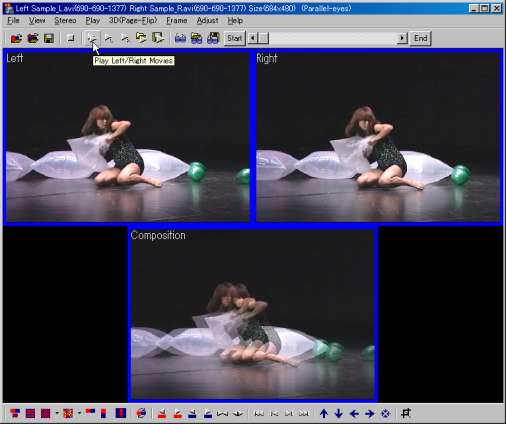
Main Window
VFW Codec;
DV Type2
Panasonic VFW DV codec
Ulead DV Converter
http://www.ulead.com/download/dvconverter/download.htm
Ulead DV Converter conveniently changes DV Type I format video to DV Type II.
Microsoft MPEG-4 Video Codec
Microsoft MPEG-4 Video Codec Pack
DivX
http://www.divx.com/divx/
XVID
XviD binaries
http://www.xvid.org/
Licence for 'StereoMovie Maker'
'StereoMovie Maker' is Freeware with the following restrictions:
'StereoMovie Maker' is not to be copied to CD-ROMs or other media without the written permission of Masuji SUTO .
I am not responsible for any damage to hardware, software or person.